Permanently Delete Facebook Account: Do u know that u can permanently delete Facebook account without consulting Facebook? Well, if you didn't know, it's your right to leave Facebook anytime you wish and Facebook has no right to hold you back.
If you are finding it very difficult to permanently delete your FB account, we will help you to do that.

If you have been on Facebook for long, you'll probably know that Facebook has made changes to how users delete their account. They've changed the location where you get to delete your account so it becomes more difficult to close your Facebook account permanently.
The good thing about all these measures that Facebook has set is that the link address for deleting Facebook is still the same.
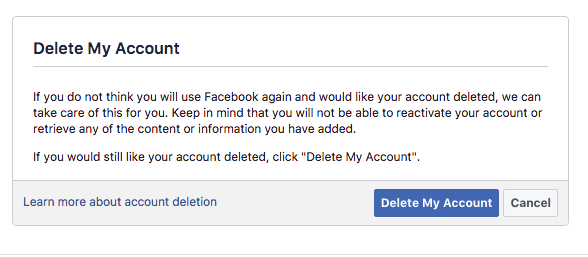
If you wish to delete your FB account right now, simply logon to www.facebook.com/help/delete_account on your web browser and then follow the onscreen instructions to delete your account.
The page will look like the one below.
Please have it in mind that it may take 14 to 90 days for Facebook to completely delete everything about your account online.
Cheers!!!
Please share this article with your friends.
If you are finding it very difficult to permanently delete your FB account, we will help you to do that.

How to permanently delete a Facebook Account
If you have been on Facebook for long, you'll probably know that Facebook has made changes to how users delete their account. They've changed the location where you get to delete your account so it becomes more difficult to close your Facebook account permanently.
The good thing about all these measures that Facebook has set is that the link address for deleting Facebook is still the same.
If you wish to delete your FB account right now, simply logon to www.facebook.com/help/delete_account on your web browser and then follow the onscreen instructions to delete your account.
The page will look like the one below.

Please have it in mind that it may take 14 to 90 days for Facebook to completely delete everything about your account online.
Cheers!!!
Please share this article with your friends.
Comments
Post a Comment