How do I delete My photos on Facebook?: Facebook is undoubtedly one of the best place where you can share your photos, videos, ideas with your friends and family. But there are times when you post a photo that you wished never went public and want to remove it as soon as possible. In this article, we intend to show you how to delete embarrassing photo or photos that you are not really proud of. See: How to Change Cover Photo on Facebook
Also in this tutorial, we'll show you how to untag yourself from photos you don't want to be tagged.
You can only delete photos that you've uploaded. If you want to untag yourself in someone else's photo, click here.
You can find your photos by selecting "Photos" from the "Apps" section of the Facebook menu, or from the Photos tab on your profile page.
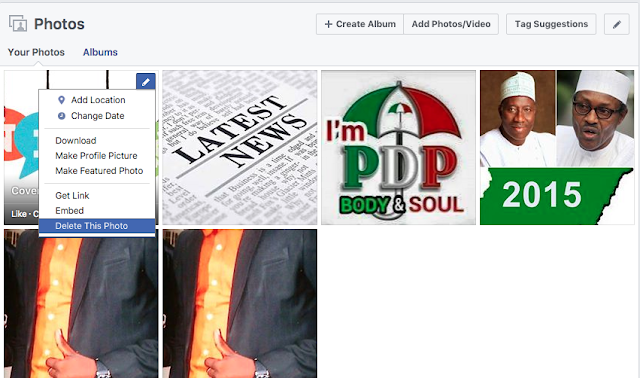
Next, at the top right of the photo (When you hover), locate the EDIT button (Looks like a pencil)
Click on the EDIT
Finally, click on Delete this photo.
That's all!
Please share this article with friends who might be in need!!!
Also in this tutorial, we'll show you how to untag yourself from photos you don't want to be tagged.
How do I delete my photos on Facebook?
To delete your photo on Facebook, do this:Find the photo you want to delete.
You can only delete photos that you've uploaded. If you want to untag yourself in someone else's photo, click here.
You can find your photos by selecting "Photos" from the "Apps" section of the Facebook menu, or from the Photos tab on your profile page.

See: How to Hide Your Photos on Facebook
Next, at the top right of the photo (When you hover), locate the EDIT button (Looks like a pencil)
Click on the EDIT
Finally, click on Delete this photo.
That's all!
Please share this article with friends who might be in need!!!
Contact customer helpline
ReplyDelete+1 866 528 5OO7
Best information ever ../