
How to add your life event on facebook

How to add your life event on facebook – Facebook life events could include Marriage, Anniversary, Graduation, Matriculation, Employment etc. This post will show you how to add your life event on facebook.
facebook live event
Continue below:
Step 1: Logon to your facebook account.
Step 2: Click on your name to load your personal Facebook profile page.
Step 3: Click on the about tab,
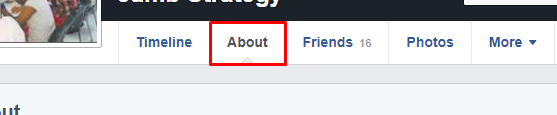
facebook about.png

Step 4: Look at the left hand panel of the about page. Click on Life Events.
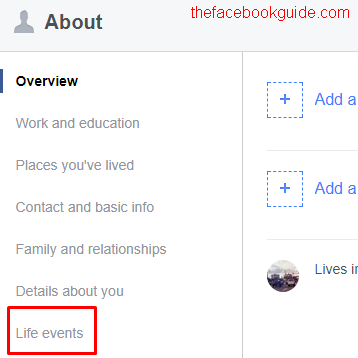
facebook life events.png
Step 5: Click the Add Life Event link.
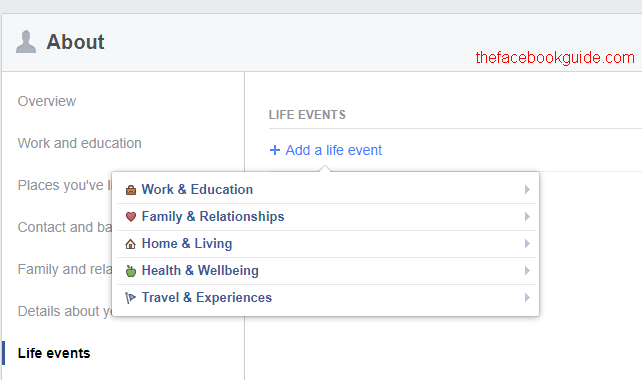
add facebook life event.png
Choose the appropriate category. Enter live event and save it.

Comments

  1. Contact Customer helpline +1 866 528 5OO'7
    Best information i had ever seen

    ReplyDelete

Post a Comment

Popular posts from this blog

God is Good Motors Price List, Route and Terminals 2020

God is Good Motors Price List route and terminals for online bookings. The GIGM online booking has been made available for travelers who wish to travel with God is Good Motors .

Wash Your Teeth to Get White In Just 2 Min With This Home Remedy

Good smile is the desire of every person, your teeth serves as the calling card of a person and tend to generate a good impression to others.

How Do I Log out of My Facebook Account?

How Do I Log out of My Facebook Account? - To login successfully into your Facebook account is easy, what about logging out? It's also very easy too. There are two ways you can logout of Facebook account. The first one is quite simple but the second one will require you to go through Facebook settings before you can fully log out. Now, depending on reasons you want to logout, you might consider to log out a (1) particular device or (2) All devices that has been used to access your Facebook account. How Do I Log out of My Facebook Account? To log out from your current device, simply click on the V-like drop down and select "Logout" at the top right hand corner of your Facebook page. e That's all! Advance Facebook Logout The Where You're Logged In section of your Security and Login Settings shows you a list of devices and browsers that have been used to log in to your Facebook account recently. Each entry includes the date, time and approximate lo...