Learn How to Deactivate Facebook Account Temporarily With Pictures - Facebook allows users to delete and deactivate their account whenever they want but having a tutorial that helps you deactivate your account with explanatory pictures is hard to find. Here we present you with How to Deactivate Facebook Account Temporarily With Pictures!!!
1). Click the Drop down Arrow on the top right of your Facebook page. You will see a list of links, click on settings. See the below image to see how it works.

2). As soon as you click the Setting, the new setting page will appear. Now, click on manage account
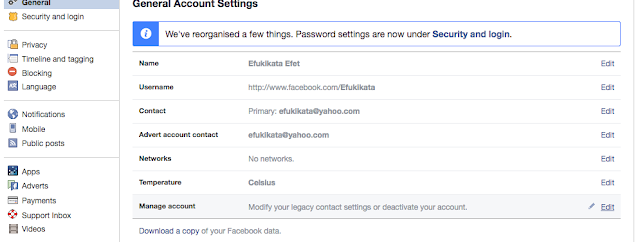
3). Click on the deactivate your account link

4). On the new page that appears, click on continue to proceed

Proceed to deactivate your Facebook account... I will stop here because I don't intend to deactivate mine.
How to Deactivate Facebook Account Temporarily With Pictures
Follow the step by step instructions below to get it right!!!1). Click the Drop down Arrow on the top right of your Facebook page. You will see a list of links, click on settings. See the below image to see how it works.

2). As soon as you click the Setting, the new setting page will appear. Now, click on manage account

3). Click on the deactivate your account link

4). On the new page that appears, click on continue to proceed

Proceed to deactivate your Facebook account... I will stop here because I don't intend to deactivate mine.
Learn How to Deactivate Facebook Account Temporarily With Pictures
ReplyDeleteContact customer support service
ReplyDelete+1-866-528-5OO7 '..'