How to delete Facebook post: Delete a Facebook post with just a single click and get on with it. This article explains everything you should know about deleting a Facebook post.
So if you mistakenly sent out a Facebook status on your timeline, you can delete it before others even get to see it.
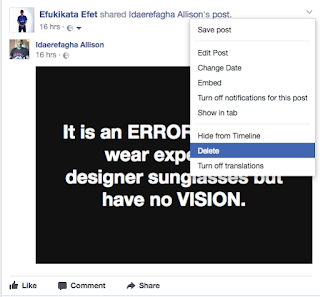
So if you mistakenly sent out a Facebook status on your timeline, you can delete it before others even get to see it.
How to delete Facebook post
Note that there is a clear difference between hiding and deleting a Facebook post - Hiding a post that you've shared from your Page will remove it from your Facebook's Timeline and not from your Facebook's activity log. When you delete a Facebook post, you'll permanently remove it from your FB Page, including your Facebook Page's activity log.
How To hide or delete a post from your Facebook Page:
- Go to the post on your Page's Timeline
- Click
 in the top-right corner
 - Select Hide from Timeline or Delete
To Unhide a post you've hidden:
- Click Settings at the top of your Facebook Page
- Click Activity Log in the left column
- Click
 next to the post you want to unhide and select Allowed on Page

Search terms: how to delete a facebook comment, how to delete facebook posts quickly, how to delete a post on facebook group, how to delete a post on someone else's wall on facebook, how to delete a post on facebook so no one can see it, how do you delete something from facebook, where is timeline on facebook, how to delete a post on facebook business page
Please keep in mind that if a post you've hidden was shared, it may still be visible to the audience it was shared with in other places on Facebook, such as in News Feed and search. Any photos you've hidden from your Page's Timeline will still be visible when people visit your Page's Photos section.
Any problem? Please leave us with a comment or see:
how do I get rid of a souse advertising from my facebook markeplace
ReplyDeletecustomer support service is +1 8'6'6 5 2 8 5OO'7 ..//.
ReplyDelete