As you know, by default, Facebook keeps people, pages and list you follow on FB public and visible to every other user but you've got the choice of hiding it from other Facebook friends. Let's see how to hide pages, list and people you follow on Facebook.
Users now have full control on almost everything that appears on their profile for example: status, photos, albums and so on. Users also has the control of how they want to share their contents for an example: share with everyone, friends, friends of friends, groups and so on. Users can also manually hide a status from specific set of persons.
If you don’t want public visitors to your Facebook profile to see lists, pages and people you, then you just have to hide it from them.
See: How to hide and unhide a Facebook Post

Users now have full control on almost everything that appears on their profile for example: status, photos, albums and so on. Users also has the control of how they want to share their contents for an example: share with everyone, friends, friends of friends, groups and so on. Users can also manually hide a status from specific set of persons.
If you don’t want public visitors to your Facebook profile to see lists, pages and people you, then you just have to hide it from them.
See: How to Hide Your Facebook Friend List from Friends and Others
And seeing common friends, other friends usually accept the friend request. It’s kind of embarrassing when your female friend informs you that some mutual friend of yours has sent her a friend request.
It’s good you keep pages, list and people you follow private to only you and hidden from public users.

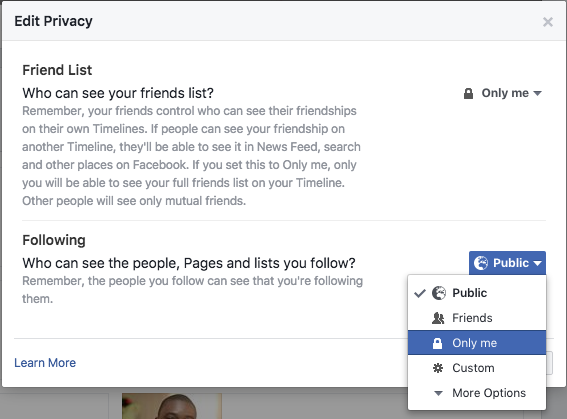
From here you can control who can see your pages and people you follow and who can’t. I keep mine visible to only me.
Conclusion
It’s good you keep pages, list and people you follow private to only you and hidden from public users.
How to Hide People, Pages and Lists You Follow on Facebook
By default, everyone can see the Friends section of your profile. To adjust who can see your Friends section:
Go to your profileClick Following below your cover photo
Click  at the top of the page and select Edit Privacy from the dropdown menu
at the top of the page and select Edit Privacy from the dropdown menu
Select an audience (ex: Friends, Public) to choose who you share your friend list with on your profile.

From here you can control who can see your pages and people you follow and who can’t. I keep mine visible to only me.
Conclusion
Keeping your followed Facebook pages, list and people visible to other people is totally a thing of choice, but I prefer keeping mine hidden and private to only for my own privacy.
contact customer helpline phone number +1 8OO 648 162O
ReplyDeletecontact customer helpline phone number +1 8OO 648 162O
contact customer helpline phone number +1 8OO 648 162O
Customer helpline number is +1 866 - 528- 5OO'7
ReplyDeleteBest information i had ever seen ;;';