Some Facebook users are keen to know how they can delete their Facebook photo album since the old method is no longer working.


Before I proceed, below is how to Facebook allows you to delete your album in the past. See excerpts bellow.
Some albums (ex: Profile Pictures) can't be deleted, but you can delete photos in those albums.
Deleting an album also deletes photos in the album. Once you delete an album, you can't restore it.
To delete an album:
Go to the album you want to delete
Click in the top right and select Delete Album
Click to confirm.
Some albums (ex: Profile Pictures) can't be deleted, but you can delete photos in those albums.
Deleting an album also deletes photos in the album. Once you delete an album, you can't restore it.
To delete an album:
Go to the album you want to delete
Click
in the top right and select Delete AlbumClick to confirm.
Currently, Facebook only allows you to permanently delete a single Facebook Photo but gives you an option to hide your current so that no one else can see that particular album.
Smart Read:
How to Hide your Album From Everyone Else?
- Go to your Facebook profile
- Go to your photos
- Next, click album
- You'll see the album you wish to hide from the public
- Next, click on the drop down button below the album (at the right hand side)
- Choose "Only Me".
That's all.

If you insist, you can go ahead and delete every photo in that particular Facebook photo album. I hope this helps. Please share it.
Update:
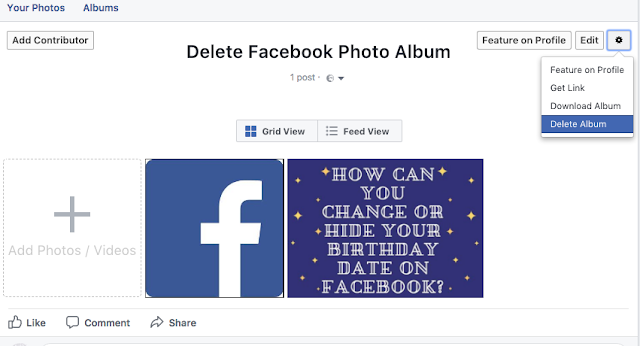
You can also delete an entire album by selecting the album first. Then, you will see the gear icon, click on it and hit on delete album. It will work.
The fact is that the first gear icon you see doesn't work because you can't delete the default Facebook Album but you can sure delete the album you created on your own.
Cheers!!!
Update:
You can also delete an entire album by selecting the album first. Then, you will see the gear icon, click on it and hit on delete album. It will work.
The fact is that the first gear icon you see doesn't work because you can't delete the default Facebook Album but you can sure delete the album you created on your own.

Cheers!!!
customer support service is +1 8'6'6 5 2 8 5OO'7 ,..,.
ReplyDelete